Case Study
Designing a Unified Tool for Store Colleagues
Designing a Unified Tool for Store Colleagues
Replacing fragmented systems with a single device built around how colleagues actually work.
Replacing fragmented systems with a single device built around how colleagues actually work.
ROLE
UX Designer
SCOPE
Ground-up design
TIMELINE
Ongoing
01 / THE PROBLEM
Too Many Systems, No Unified Experience
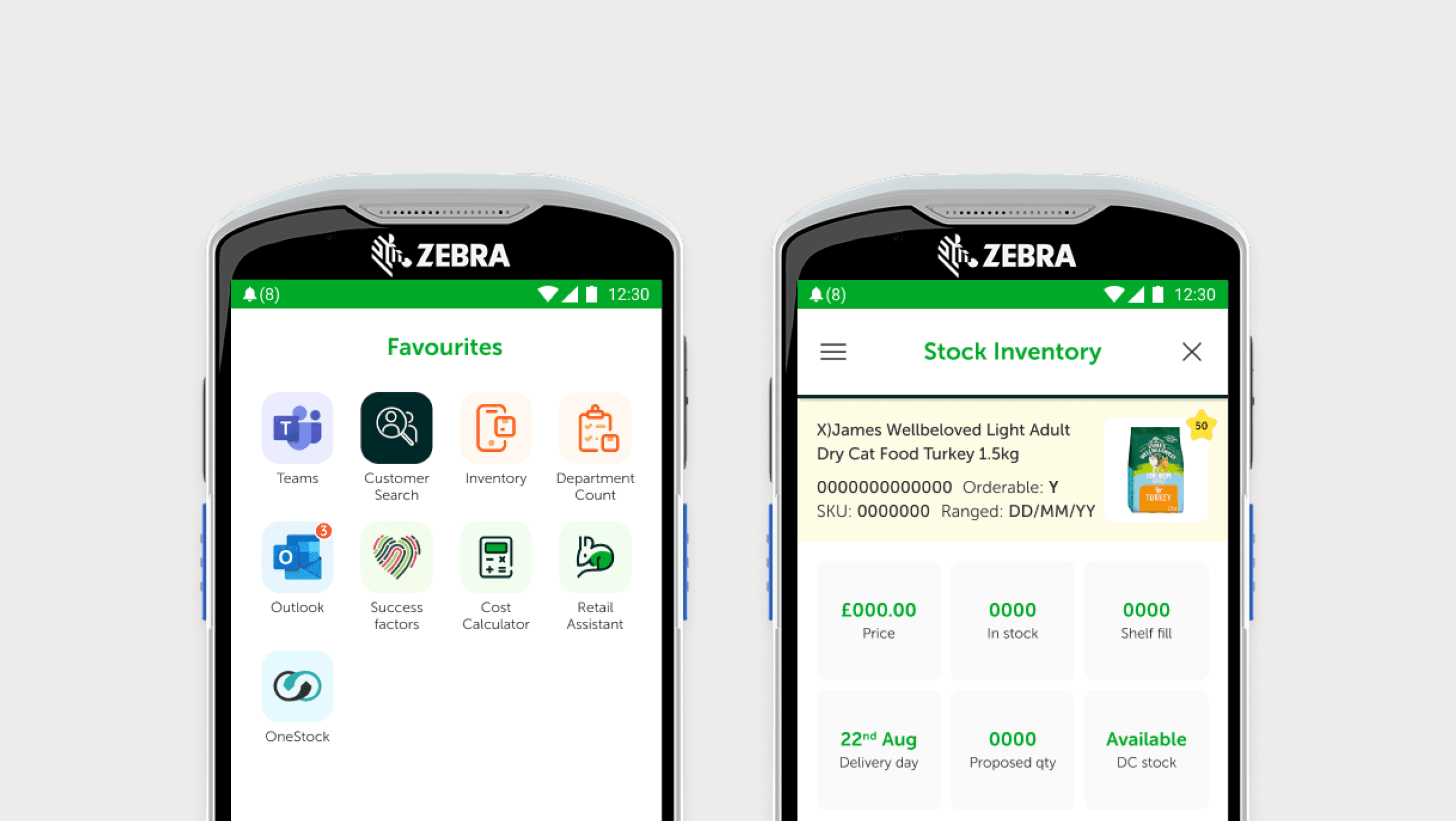
Before ACE, store colleagues were working across a patchwork of disconnected tools.
A shared iPad ran an outdated system that had been built without UX input and without colleague feedback. It was difficult to use, counter-intuitive, and required too many steps to complete basic tasks.
Stock taking and ticket printing lived on a separate device. Anything more complex meant walking to the back of the store to use a desktop PC. There was no voice communication between colleagues.
The result: wasted time, friction at every turn, and a system that worked against the people using it rather than for them.
Before | After |
|---|---|
|
|
01 / THE PROBLEM
Too Many Systems, No Unified Experience
Before ACE, store colleagues were working across a patchwork of disconnected tools.
A shared iPad ran an outdated system that had been built without UX input and without colleague feedback. It was difficult to use, counter-intuitive, and required too many steps to complete basic tasks.
Stock taking and ticket printing lived on a separate device. Anything more complex meant walking to the back of the store to use a desktop PC. There was no voice communication between colleagues.
The result: wasted time, friction at every turn, and a system that worked against the people using it rather than for them.
Before | After |
|---|---|
|
|
02 / THE QUESTION
Building a System From Scratch
The goal was to unify everything into a single device. But this wasn't just a reskin. We needed to replatform dozens of different tasks, each with their own workflows and edge cases.
That required a design system versatile enough to support rapid UX development across very different features: inventory management, customer accounts, subscriptions, adoption centre processes, click and collect, voice comms.
There was also a technical constraint. The device runs on Android, but we needed to lock it down for enterprise use. No system buttons, no native Android navigation. Our interface had to handle all navigation itself, comprehensively and intuitively.
The constraint that shaped everything
With native Android navigation disabled, I had to design a complete navigation system from scratch. It needed to handle app switching, back navigation, home access, and notifications, and be learnable in minutes.
02 / THE QUESTION
Building a System From Scratch
The goal was to unify everything into a single device. But this wasn't just a reskin. We needed to replatform dozens of different tasks, each with their own workflows and edge cases.
That required a design system versatile enough to support rapid UX development across very different features: inventory management, customer accounts, subscriptions, adoption centre processes, click and collect, voice comms.
There was also a technical constraint. The device runs on Android, but we needed to lock it down for enterprise use. No system buttons, no native Android navigation. Our interface had to handle all navigation itself, comprehensively and intuitively.
The constraint that shaped everything
With native Android navigation disabled, I had to design a complete navigation system from scratch. It needed to handle app switching, back navigation, home access, and notifications, and be learnable in minutes.
03 / THE APPROACH
Designing With Colleagues, Not For Them
I worked directly with store colleagues throughout the process. Not surveys or secondhand feedback, but actually talking to the people who would use this device every day.
What tasks take the longest? Where do you get stuck? What information do you need and when?
This shaped everything from the information architecture to the default behaviours. For example, the barcode scanner is the primary input method for most tasks. Scan a product and it opens directly into the inventory system. Scan a customer's Pets Club card and it takes you straight to their account.
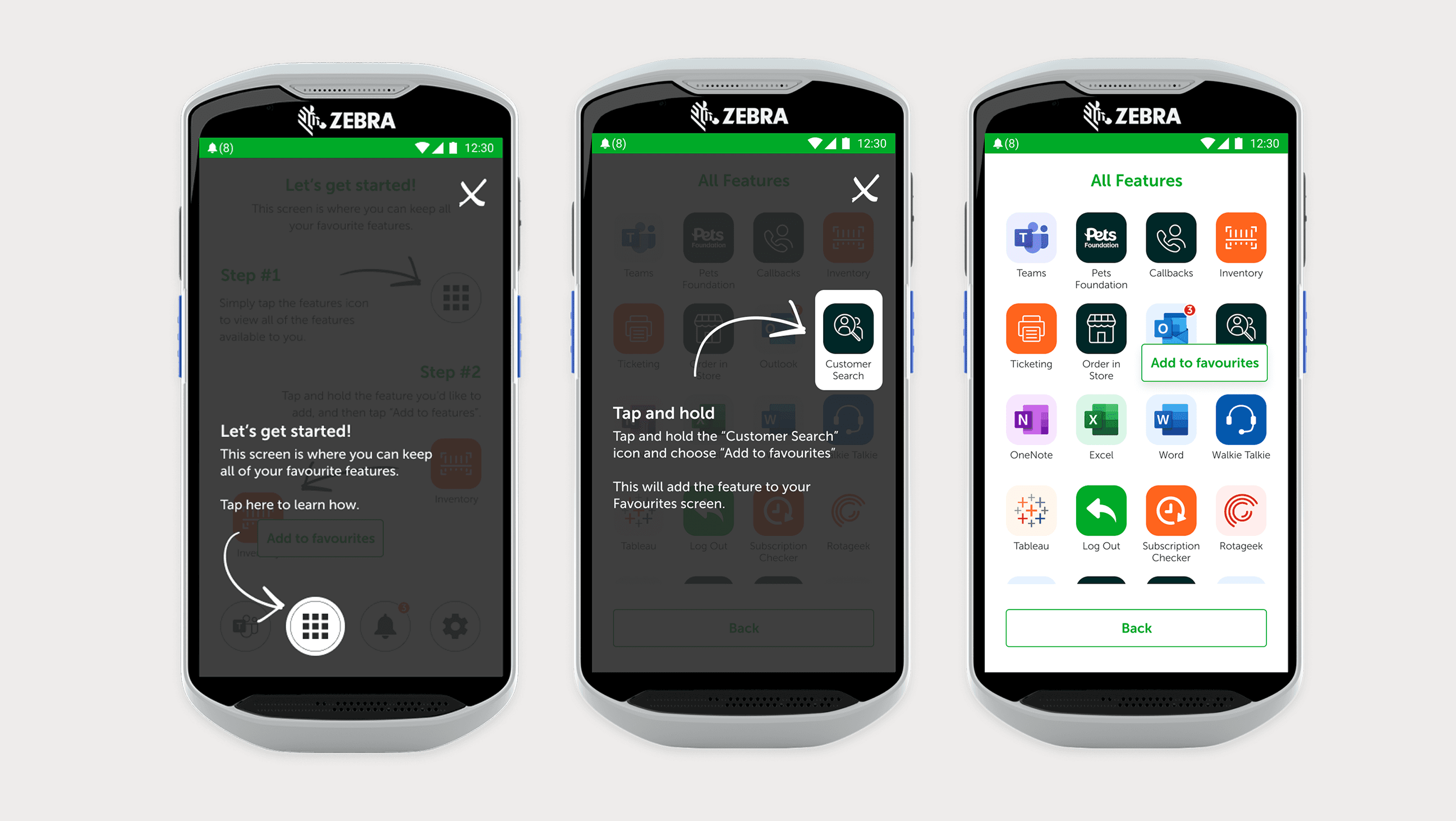
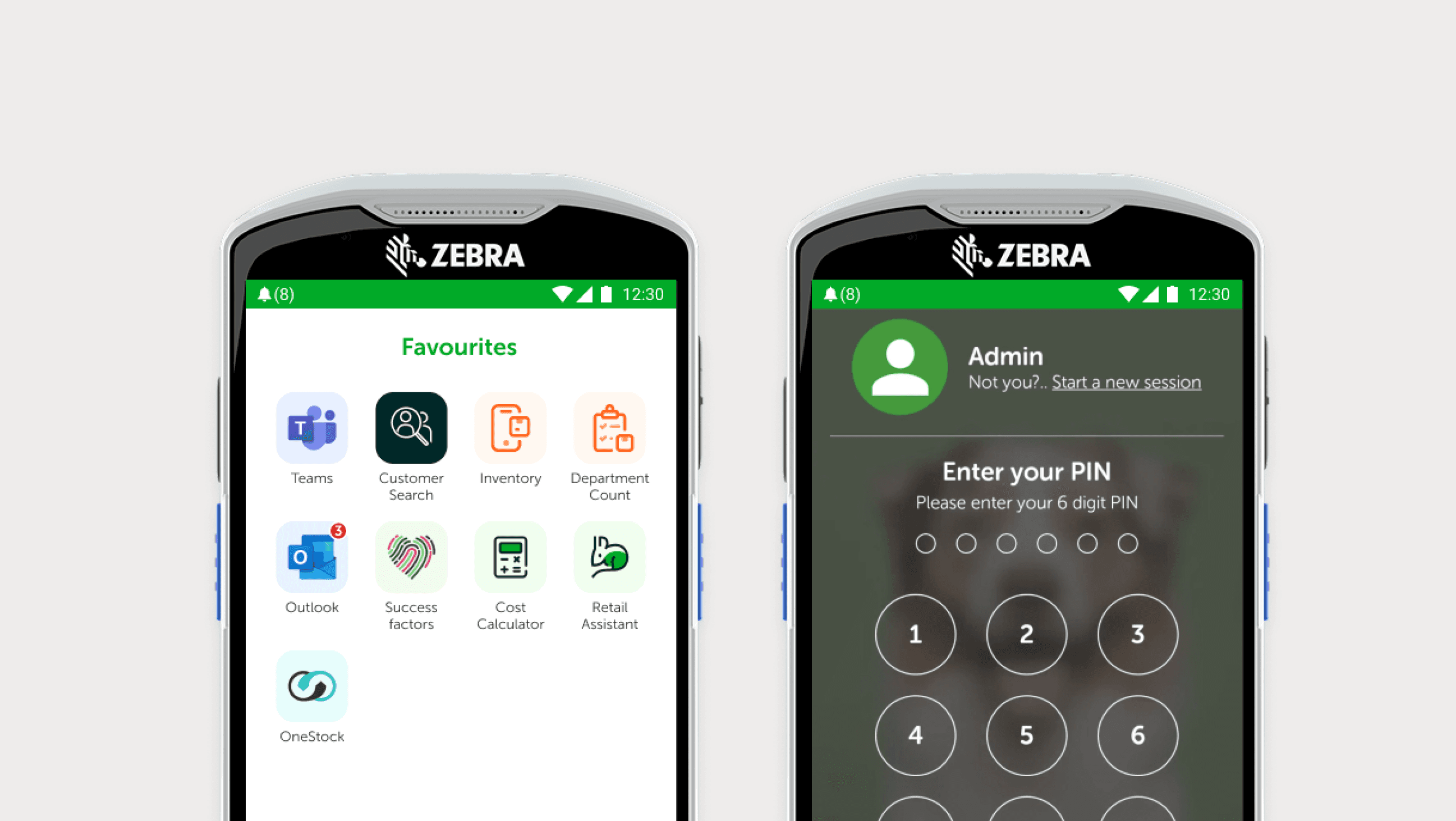
The favourites system came from wanting to follow established patterns. Colleagues already know how their personal Android phones work. Letting them customise their homescreen with the tools they use most meant less learning and faster access.
03 / THE APPROACH
Designing With Colleagues, Not For Them
I worked directly with store colleagues throughout the process. Not surveys or secondhand feedback, but actually talking to the people who would use this device every day.
What tasks take the longest? Where do you get stuck? What information do you need and when?
This shaped everything from the information architecture to the default behaviours. For example, the barcode scanner is the primary input method for most tasks. Scan a product and it opens directly into the inventory system. Scan a customer's Pets Club card and it takes you straight to their account.
The favourites system came from wanting to follow established patterns. Colleagues already know how their personal Android phones work. Letting them customise their homescreen with the tools they use most meant less learning and faster access.
04 / KEY FEATURES
One Device, Every Task
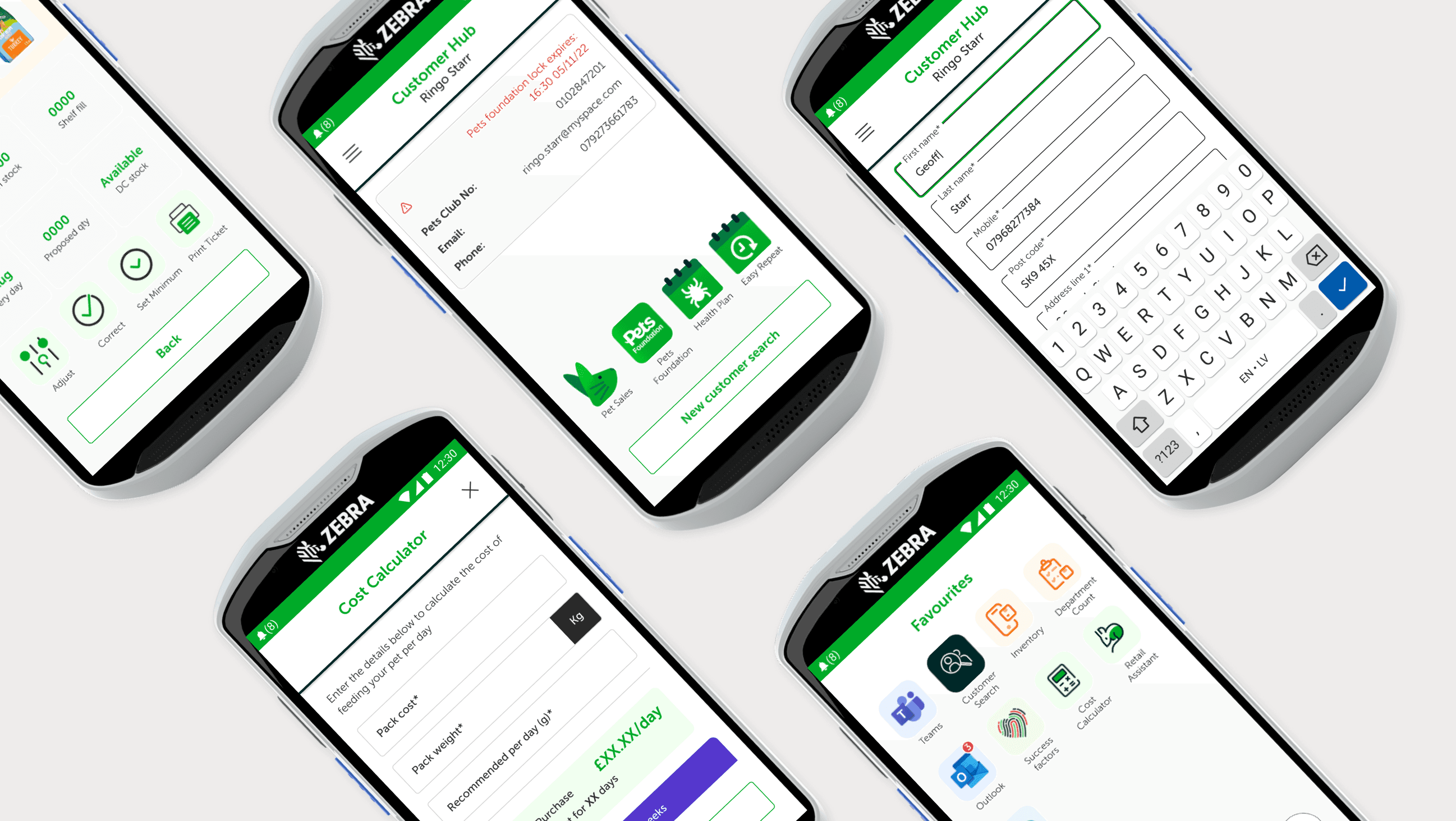
The ACE device covers the full range of what a store colleague needs to do:
Inventory & Stock
Check stock levels, see when deliveries arrive, view sales data, adjust inventory, print tickets. Scan any product to get there instantly.
Customer Hub
Search for a customer or scan their Pets Club card. Set up subscriptions, sell pets, update details. Everything in one place.
Adoption Centre
Manage the full adoption process: accepting pets, quarantine tracking, adoption paperwork.
Operations
Check in deliveries, manage click and collect orders, handle day-to-day store tasks.
Subscriptions
Set up Easy Repeat orders and flea, tick and worm plans. Scan products to add them to subscriptions.
Communication
Teams integration for voice comms between colleagues. No more shouting across the store.
04 / KEY FEATURES
One Device, Every Task
The ACE device covers the full range of what a store colleague needs to do:
Inventory & Stock
Check stock levels, see when deliveries arrive, view sales data, adjust inventory, print tickets. Scan any product to get there instantly.
Customer Hub
Search for a customer or scan their Pets Club card. Set up subscriptions, sell pets, update details. Everything in one place.
Adoption Centre
Manage the full adoption process: accepting pets, quarantine tracking, adoption paperwork.
Operations
Check in deliveries, manage click and collect orders, handle day-to-day store tasks.
Subscriptions
Set up Easy Repeat orders and flea, tick and worm plans. Scan products to add them to subscriptions.
Communication
Teams integration for voice comms between colleagues. No more shouting across the store.
05 / DESIGN DECISIONS
Built for the Context
Custom navigation
With native Android buttons disabled, I designed a navigation system that handles everything: app switching, back navigation, home access, notifications. It needed to be learnable in minutes, not hours.
Barcode-first interaction
The scanner is always ready. Default behaviour opens inventory, but context matters. In Easy Repeat setup, scanning adds the product to the subscription. In Customer Hub, scanning a Pets Club card pulls up that customer. The device anticipates what you're trying to do.
Favourites over app drawers
Rather than burying tools in menus, colleagues pin what they need to their homescreen. Different roles, different setups. A colleague focused on adoptions sees different tools than one focused on stock.
Onboarding that stays out of the way
New colleagues get a quick walkthrough of how to customise their favourites. After that, the system is intuitive enough that formal training is minimal.
05 / DESIGN DECISIONS
Built for the Context
Custom navigation
With native Android buttons disabled, I designed a navigation system that handles everything: app switching, back navigation, home access, notifications. It needed to be learnable in minutes, not hours.
Barcode-first interaction
The scanner is always ready. Default behaviour opens inventory, but context matters. In Easy Repeat setup, scanning adds the product to the subscription. In Customer Hub, scanning a Pets Club card pulls up that customer. The device anticipates what you're trying to do.
Favourites over app drawers
Rather than burying tools in menus, colleagues pin what they need to their homescreen. Different roles, different setups. A colleague focused on adoptions sees different tools than one focused on stock.
Onboarding that stays out of the way
New colleagues get a quick walkthrough of how to customise their favourites. After that, the system is intuitive enough that formal training is minimal.
06 / THE RESULTS
What Changed
Thousands of hours saved
Deployed across 450+ stores, tasks that required multiple devices and trips to the back office now happen on the shop floor.
Minimal training
Even colleagues who described themselves as not good with technology picked it up without issue.
Positive feedback
Colleagues were part of building it, and it shows in how they use it.
06 / THE RESULTS
What Changed
Thousands of hours saved
Deployed across 450+ stores, tasks that required multiple devices and trips to the back office now happen on the shop floor.
Minimal training
Even colleagues who described themselves as not good with technology picked it up without issue.
Positive feedback
Colleagues were part of building it, and it shows in how they use it.
"The familiar patterns and streamlined workflows meant adoption was fast. This wasn't a system imposed on colleagues. They shaped it."
07 / WHAT'S NEXT
Still Evolving
The current project is replacing a desktop system that contains dozens of eForms. Colleagues currently have to leave the shop floor to complete these on a PC in the back.
We're simplifying this down to 8 forms that will live on the ACE device. Some of these will be completable via AI voice commands, letting colleagues fill in forms while their hands are busy with other tasks.
The device keeps growing with the needs of the people using it.
Coming soon
AI-powered voice forms, reducing dozens of desktop eForms to 8 mobile-friendly versions.
07 / WHAT'S NEXT
Still Evolving
The current project is replacing a desktop system that contains dozens of eForms. Colleagues currently have to leave the shop floor to complete these on a PC in the back.
We're simplifying this down to 8 forms that will live on the ACE device. Some of these will be completable via AI voice commands, letting colleagues fill in forms while their hands are busy with other tasks.
The device keeps growing with the needs of the people using it.
Coming soon
AI-powered voice forms, reducing dozens of desktop eForms to 8 mobile-friendly versions.