Case Study
Building a Competitive Analysis Tool with AI
Building a Competitive Analysis Tool with AI
How I used AI-assisted development to turn a week of manual work into 10 minutes
How I used AI-assisted development to turn a week of manual work into 10 minutes
ROLE
Designer / Product Owner
SCOPE
Claude Code / VSCode
TIMELINE
A Few Days
01 / The Problem
Manual Audits Don't Scale
Competitive UX analysis is essential for almost any design project. Understanding where competitors are strong, where they're weak, and where you can differentiate requires looking at multiple sites against consistent criteria.
The problem: doing this manually takes days. Sometimes a week. You capture screenshots, work through evaluation criteria, document findings, spot patterns across competitors. It's valuable work, but the time cost means you analyse fewer sites than you should.
For the basket optimisation project, I needed to audit 16 competitor sites against Baymard Institute guidelines. Doing that manually would have taken the better part of a week. And even then, the output would be notes in a document, not something structured enough to surface patterns automatically.
I wanted a tool that could do the analysis faster and at a scale that manual work couldn't match.
The constraint
I'm not a developer. I understand logic and systems thinking from a Visual Studio course in the late 90s, but I don't write Python or React. If this tool was going to exist, I'd need to build it a different way.
01 / The Problem
Manual Audits Don't Scale
Competitive UX analysis is essential for almost any design project. Understanding where competitors are strong, where they're weak, and where you can differentiate requires looking at multiple sites against consistent criteria.
The problem: doing this manually takes days. Sometimes a week. You capture screenshots, work through evaluation criteria, document findings, spot patterns across competitors. It's valuable work, but the time cost means you analyse fewer sites than you should.
For the basket optimisation project, I needed to audit 16 competitor sites against Baymard Institute guidelines. Doing that manually would have taken the better part of a week. And even then, the output would be notes in a document, not something structured enough to surface patterns automatically.
I wanted a tool that could do the analysis faster and at a scale that manual work couldn't match.
The constraint
I'm not a developer. I understand logic and systems thinking from a Visual Studio course in the late 90s, but I don't write Python or React. If this tool was going to exist, I'd need to build it a different way.
02 / THE QUESTION
What the Tool Does
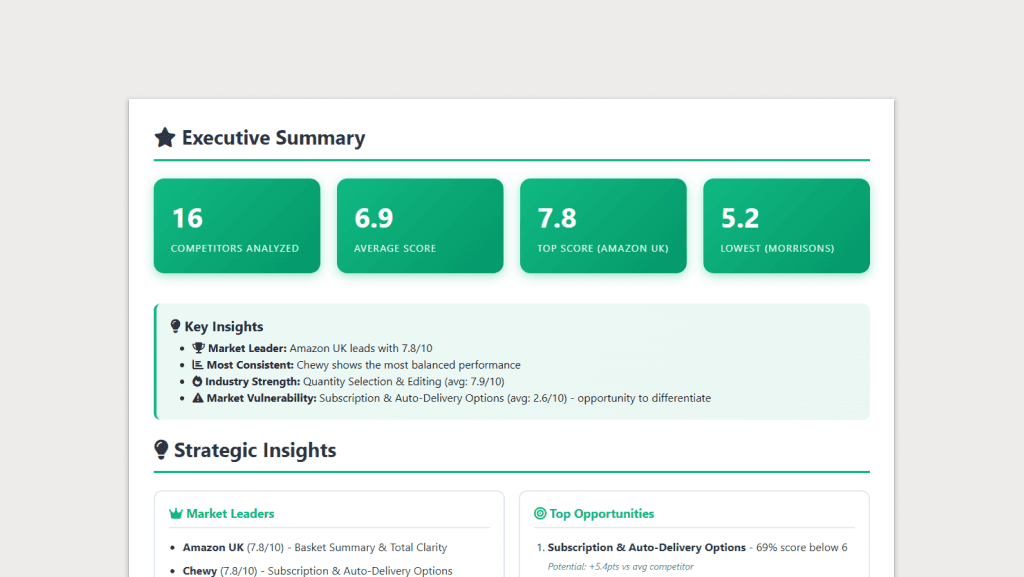
The UX Maturity Analysis tool automates competitive audits using Claude's vision capabilities. It captures screenshots of competitor pages, analyses them against research-backed criteria, and generates a report highlighting where the market is strong, where it's weak, and where opportunities exist.
The workflow:
Enter competitor URLs and select the page type (homepage, product page, basket, checkout)
Playwright opens each site in a browser window
I navigate, close cookie banners, add products if needed, then trigger the screenshot
Screenshots are analysed in parallel via Claude API calls
The tool generates an interactive HTML report with findings
The criteria come from Baymard Institute and Nielsen Norman Group research, configured in YAML files for each page type. Different page types get different evaluation criteria.
16 pages snalysed in ~10 minutes
11 criteria per page type, research-backed
Days → Minutes: Time reduction vs manual audit
02 / THE QUESTION
What the Tool Does
The UX Maturity Analysis tool automates competitive audits using Claude's vision capabilities. It captures screenshots of competitor pages, analyses them against research-backed criteria, and generates a report highlighting where the market is strong, where it's weak, and where opportunities exist.
The workflow:
Enter competitor URLs and select the page type (homepage, product page, basket, checkout)
Playwright opens each site in a browser window
I navigate, close cookie banners, add products if needed, then trigger the screenshot
Screenshots are analysed in parallel via Claude API calls
The tool generates an interactive HTML report with findings
The criteria come from Baymard Institute and Nielsen Norman Group research, configured in YAML files for each page type. Different page types get different evaluation criteria.
16 pages snalysed in ~10 minutes
11 criteria per page type, research-backed
Days → Minutes: Time reduction vs manual audit
03 / The Build
Building With Claude Code
I built this with Claude Code over a few days. I described what I needed; Claude Code chose the tech stack and wrote the implementation. Python, Playwright for browser automation, Plotly for charts, YAML for configuration. None of these were my choices. I didn't know enough to make them.
My role was product owner and director. I defined the problem, described the desired outcome, and made decisions when things didn't work as expected.
The Playwright problem
The original plan was fully automated: the tool would visit each URL, capture screenshots, and analyse them without intervention. But competitor sites kept blocking Playwright, even with stealth mode enabled. Bot detection is good enough now that automated browsers get caught.
When I described the problem, we pivoted to human-in-the-loop. The browser opens, I take control to navigate and prepare the page, then hand back to the tool to capture screenshots. It's not fully automated, but it works reliably.
What emerged organically
The YAML-based criteria configuration wasn't planned. Claude Code suggested it as a way to support different page types without code changes. The parallel API calls that make analysis fast, the heatmap that surfaces patterns across competitors, the report structure that leads with exploitable weaknesses: these emerged through iteration, not upfront specification.
The report quality surprised me. I expected to spend significant time refining the output. Instead, Claude Code delivered something close to final on the first pass.
03 / The Build
Building With Claude Code
I built this with Claude Code over a few days. I described what I needed; Claude Code chose the tech stack and wrote the implementation. Python, Playwright for browser automation, Plotly for charts, YAML for configuration. None of these were my choices. I didn't know enough to make them.
My role was product owner and director. I defined the problem, described the desired outcome, and made decisions when things didn't work as expected.
The Playwright problem
The original plan was fully automated: the tool would visit each URL, capture screenshots, and analyse them without intervention. But competitor sites kept blocking Playwright, even with stealth mode enabled. Bot detection is good enough now that automated browsers get caught.
When I described the problem, we pivoted to human-in-the-loop. The browser opens, I take control to navigate and prepare the page, then hand back to the tool to capture screenshots. It's not fully automated, but it works reliably.
What emerged organically
The YAML-based criteria configuration wasn't planned. Claude Code suggested it as a way to support different page types without code changes. The parallel API calls that make analysis fast, the heatmap that surfaces patterns across competitors, the report structure that leads with exploitable weaknesses: these emerged through iteration, not upfront specification.
The report quality surprised me. I expected to spend significant time refining the output. Instead, Claude Code delivered something close to final on the first pass.
04 / Real Application
Using It for Basket Optimisation
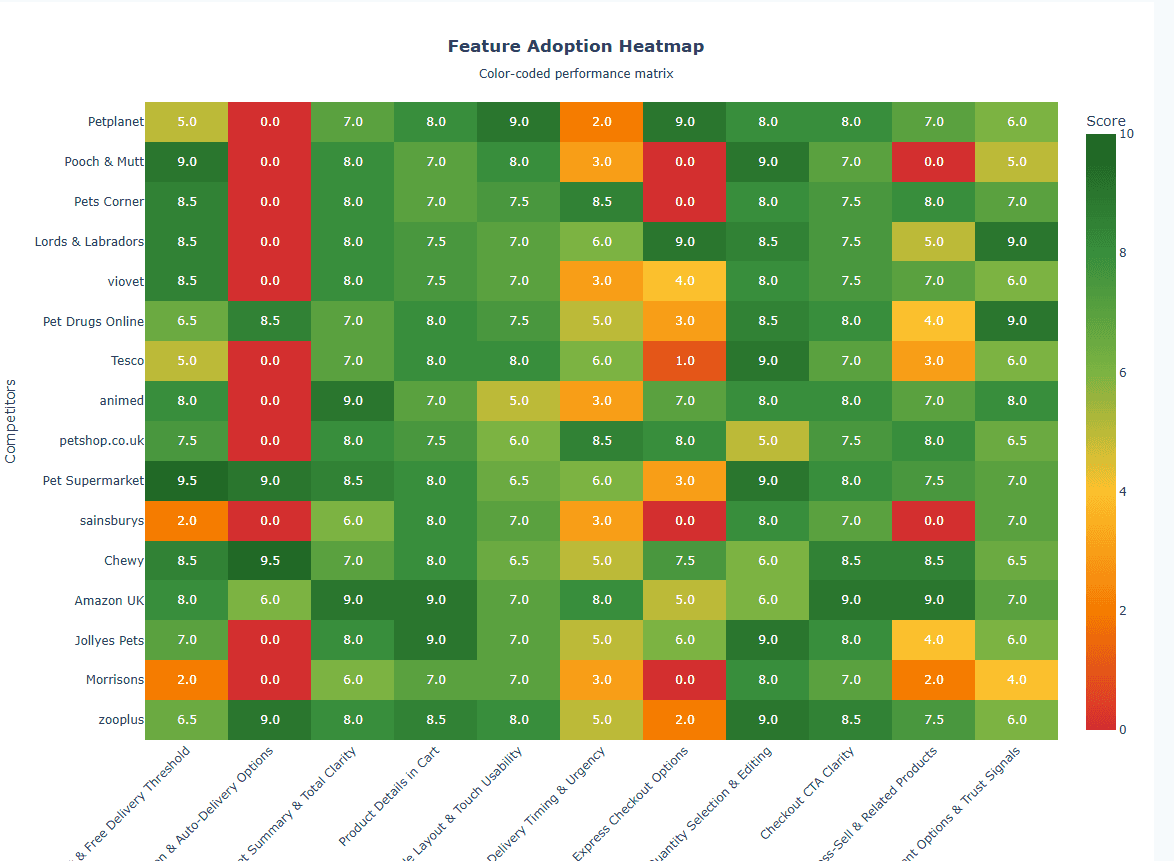
The tool's first real use was the competitor analysis for my basket optimisation project. I analysed 16 pet retail sites against 11 basket-specific criteria.
The report surfaced two market-wide weaknesses I might have missed doing this manually:
Subscription options were absent or poorly implemented across 60% of competitors. For a category like pet food where repeat purchase is the norm, this is a significant gap.
Express checkout options were weak across the market. Most competitors funnelled everyone through the same checkout flow regardless of whether they were returning customers.
What the tool surfaced
Market-wide weaknesses in subscription UX and express checkout. Both became priorities in my basket redesign, backed by evidence rather than assumption.
These findings directly shaped my basket proposal. The redesign now prioritises easy repurchase: buy it again functionality, saved for later, and a simple repeat toggle. Features that address genuine gaps in the competitive landscape, not just assumptions about what users want.
View the full competitor analysis report
See the complete analysis of 16 pet retail basket pages with interactive visualisations and detailed findings.
04 / Real Application
Using It for Basket Optimisation
The tool's first real use was the competitor analysis for my basket optimisation project. I analysed 16 pet retail sites against 11 basket-specific criteria.
The report surfaced two market-wide weaknesses I might have missed doing this manually:
Subscription options were absent or poorly implemented across 60% of competitors. For a category like pet food where repeat purchase is the norm, this is a significant gap.
Express checkout options were weak across the market. Most competitors funnelled everyone through the same checkout flow regardless of whether they were returning customers.
What the tool surfaced
Market-wide weaknesses in subscription UX and express checkout. Both became priorities in my basket redesign, backed by evidence rather than assumption.
These findings directly shaped my basket proposal. The redesign now prioritises easy repurchase: buy it again functionality, saved for later, and a simple repeat toggle. Features that address genuine gaps in the competitive landscape, not just assumptions about what users want.
View the full competitor analysis report
See the complete analysis of 16 pet retail basket pages with interactive visualisations and detailed findings.
05 / The Results
What Changed
The time saving is significant, but the bigger impact is scope. I analysed 16 competitors because the tool made it practical. Manually, I would have done 3 or 4 and hoped they were representative. More data means more confidence in the patterns you're seeing.
The structured output also matters. A heatmap showing scores across 16 competitors and 11 criteria surfaces patterns that are hard to see when your analysis lives in scattered notes. Universal weaknesses become obvious. So do the competitors worth studying more closely.
05 / The Results
What Changed
The time saving is significant, but the bigger impact is scope. I analysed 16 competitors because the tool made it practical. Manually, I would have done 3 or 4 and hoped they were representative. More data means more confidence in the patterns you're seeing.
The structured output also matters. A heatmap showing scores across 16 competitors and 11 criteria surfaces patterns that are hard to see when your analysis lives in scattered notes. Universal weaknesses become obvious. So do the competitors worth studying more closely.
06 / What I Learned
AI-Assisted Development Works
I built software without writing code. Not a prototype, not a proof of concept: a tool I've used for real work that changed how I approached a project. The barrier to building things has dropped significantly.
Direct When It Works, Pivot When It Doesn't
The fully automated approach failed. Rather than forcing it, we changed the model. Human-in-the-loop is less elegant but more reliable. Knowing when to pivot matters more than defending the original plan.
Tools Should Surface What Matters First
The report structure leads with market-wide weaknesses because that's what I need to make decisions. The tool doesn't just collect data; it organises it around the question I'm actually trying to answer: where can we differentiate?
This Is How I'll Work Now
The combination of AI-assisted prototyping (minibasket project) and AI-assisted tool building (this project) has changed my workflow. Problems that would have required developer time or manual effort now have a third option.
06 / What I Learned
AI-Assisted Development Works
I built software without writing code. Not a prototype, not a proof of concept: a tool I've used for real work that changed how I approached a project. The barrier to building things has dropped significantly.
Direct When It Works, Pivot When It Doesn't
The fully automated approach failed. Rather than forcing it, we changed the model. Human-in-the-loop is less elegant but more reliable. Knowing when to pivot matters more than defending the original plan.
Tools Should Surface What Matters First
The report structure leads with market-wide weaknesses because that's what I need to make decisions. The tool doesn't just collect data; it organises it around the question I'm actually trying to answer: where can we differentiate?
This Is How I'll Work Now
The combination of AI-assisted prototyping (minibasket project) and AI-assisted tool building (this project) has changed my workflow. Problems that would have required developer time or manual effort now have a third option.